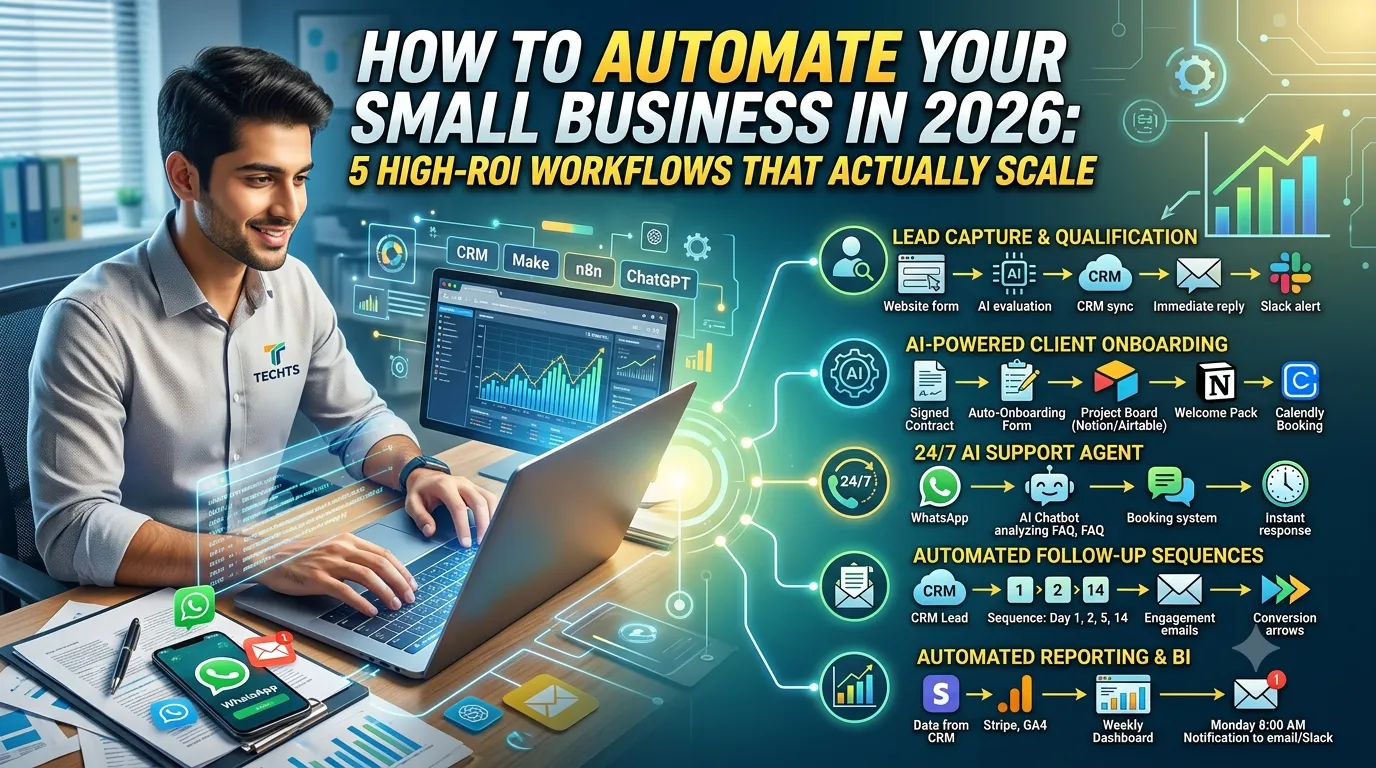
How to Automate Your Small Business in 2026: 5 High-ROI Workflows That Actually Scale
Stop wasting 20+ hours a week on tasks AI can handle. Here are 5 proven automation workflows small businesses are using in 2026 to cut costs, respond faster, and scale without hiring.
82% of small businesses have now invested in AI tools. But most of them are still doing the same manual work they did three years ago — just with a ChatGPT tab open on the side.
The problem isn't awareness. It's execution. Most business owners don't know which workflows to automate first, what tools to connect, or how to measure whether it's working.
This post fixes that. These are the 5 automation workflows I deploy most often for clients at TECHTS — the ones that pay for themselves fastest and free up the most time. Each one is practical, specific, and buildable today.
Why Automation ROI Fails for Most Small Businesses
Before the workflows — a quick diagnosis.
Most failed automation attempts share the same mistake: automating the wrong thing first. They automate low-friction tasks (like scheduling social posts) while leaving high-friction tasks (like following up on leads) fully manual.
The rule I use with every client: automate where speed = money.
Wherever a slow response directly costs you a lead, a booking, or a sale — that is where automation earns its money fastest. Start there. Every time.
Workflow 1: Automated Lead Capture and Qualification
Time saved: 5–8 hours/week | ROI timeline: Week 1
This is the single highest-ROI automation for any business that relies on inbound leads. When a potential client fills out your contact form, books a call, or sends a WhatsApp message — what happens next determines whether you close them.
Most businesses: lead sits in an inbox for 4–24 hours. By then, they have already moved on.
What this workflow does:
Contact form submission triggers instantly
AI classifies the lead (budget range, urgency, service match)
Qualified leads get an immediate personalized reply via email and WhatsApp
Lead data is pushed into your CRM (HubSpot, Notion, Airtable — whatever you use)
You get a Slack or email notification with the full lead summary
Tools to build it: n8n or Make + OpenAI + WhatsApp Business API + your CRM
Real result from a TECHTS client: A healthcare clinic in our portfolio went from a 6-hour average lead response time to under 90 seconds. Qualified bookings increased by 39% in 30 days — same lead volume, same team, faster system.
The math is simple. The clinic that calls back first wins. Automate first contact and you win by default.
Workflow 2: AI-Powered Client Onboarding
Time saved: 3–5 hours per new client | ROI timeline: First client
New client onboarding is one of the most repetitive, document-heavy, copy-paste-heavy tasks in any service business. You ask the same questions, send the same forms, chase the same signatures, and compile the same intake documents — every single time.
Automating this does not just save time. It makes your business look more professional than 90% of your competitors on day one.
What this workflow does:
Client signs contract → triggers automated onboarding sequence
Welcome email with a branded onboarding form (project details, brand assets, access credentials)
Form submission auto-populates a Notion or Airtable project board
Documents sent for e-signature via DocuSign or PandaDoc
Kickoff meeting booked automatically via Calendly integration
Client added to your project management tool with correct permissions
Tools to build it: Make + Typeform or Tally + Notion + Calendly + DocuSign
Real result: One of our finance advisory clients cut their onboarding time from 3 days to under 4 hours. Their clients reported a dramatically better first impression — and the team saved 33% of admin workload per month.
First impressions stick. Automate onboarding and yours are always sharp.
Workflow 3: 24/7 AI Customer Support Agent
Time saved: 8–15 hours/week | ROI timeline: 2–3 weeks
This is the one that feels like science fiction the first time you see it working. A customer sends a message at 2am on a Sunday asking about pricing, availability, or order status — and they get a detailed, accurate, personalized reply within seconds.
Not a chatbot with canned responses. An actual AI agent that reads your business knowledge base, checks your booking system or inventory, and responds like a trained support rep.
What this workflow does:
AI agent is trained on your FAQs, pricing, policies, and service details
Connects to your booking system, CRM, or order management tool
Handles: pricing questions, availability checks, appointment rescheduling, refund policy, basic troubleshooting
Escalates to a human when needed (flags complex or emotional situations)
Logs all conversations for your review
Tools to build it: n8n or Make + OpenAI GPT-4o or Claude + WhatsApp Business API or website chat widget + your booking/CRM tool
Real result: A hospitality client deployed our StayBot concierge and reduced front desk inquiry volume by 45%. Guest response time dropped to under 30 seconds around the clock. Upsell revenue increased 18% because the AI consistently recommended upgrades at the right moment.
Hiring a 24/7 support rep costs $3,000–$5,000 a month. An AI agent costs a fraction of that and never has a bad day.
Workflow 4: Automated Follow-Up and Re-Engagement Sequences
Time saved: 4–6 hours/week | ROI timeline: 2–4 weeks
Revenue is being left on the table in your CRM right now. Leads who never heard back. Proposals that went quiet. Past clients who haven't been contacted in 6 months.
Manual follow-up requires discipline most people don't sustain. Automated follow-up runs forever on a schedule you define once.
What this workflow does:
New lead enters CRM → follow-up sequence starts automatically
Day 1: Immediate reply. Day 2: Case study or social proof. Day 5: "Did you have any questions?" Day 14: Final check-in with a soft CTA
Proposal sent → reminder fires if no response in 48 hours
Past client → quarterly re-engagement email ("We just launched X, thought of you")
All sequences pause the moment a reply is received
Tools to build it: n8n or Make + your CRM + email provider (Mailchimp, ConvertKit, or Gmail API)
Real result: A real estate agency client we worked with ran this on their existing cold lead list — prospects who had gone quiet over 3 months. The automated re-engagement sequence brought back 12 conversations in the first two weeks and closed 2 deals. Zero cold calls. Zero extra hours.
The money is already in your list. You just need a system to go get it.
Workflow 5: Automated Reporting and Business Intelligence
Time saved: 2–4 hours/week | ROI timeline: Month 1
Every week or month, someone in your business — usually you — manually pulls data from 5 different places, pastes it into a spreadsheet, formats it, and sends a summary. This is pure automation work disguised as "management."
What this workflow does:
Pulls data from your key sources on a schedule (Google Analytics, Stripe, CRM, ads platforms, WhatsApp, email)
Calculates your key metrics automatically (leads, conversion rate, revenue, response time, churn)
Formats a clean summary report
Sends it to your email or Slack every Monday morning at 8am — before you have had your coffee
Tools to build it: n8n or Make + Google Sheets or Airtable + your data sources (Stripe API, GA4, CRM API) + Slack or email
Real result: This sounds like the least exciting automation but it might be the one that changes how you make decisions fastest. When you see real numbers every Monday — automatically, without anyone compiling them — you start catching problems in week 2 instead of month 3.
We set this up for every retainer client as standard. It takes 2–3 hours to build and saves dozens every year.
The Right Order to Build These
If you are starting from zero, do not try to build all five at once. Here is the sequence that generates the fastest return:
Lead capture + qualification — this pays for everything else
Client onboarding — makes you look professional immediately
AI customer support — frees the most daily time
Follow-up sequences — turns dead leads into revenue
Reporting — locks in long-term decision-making speed
Build one, measure it for two weeks, then build the next.
What These Workflows Actually Cost to Build
You can build all five of these yourself if you have the time and technical patience. The tools are mostly free or low-cost:
n8n (self-hosted): Free
Make: From $9/month
OpenAI API: Pay per use (typically $20–$100/month for small business volume)
WhatsApp Business API: From $15/month
Total DIY cost: $50–$150/month in tools. Time to build from scratch: 40–80 hours if you are learning as you go.
If you want these deployed properly and integrated with your actual systems — without spending 2 months learning workflow tools — that is exactly what we build at TECHTS. Most projects like this fall in the $1,500–$3,000 range and are live within 2–4 weeks.
The Bottom Line
Automation is not about replacing your team. It is about making sure that the hours your team spends are spent on work that actually requires a human — not on copy-pasting, chasing, formatting, and repeating the same thing for the hundredth time.
Every workflow in this list removes one of those repetitive drains and either saves you money, speeds up your revenue cycle, or both.
Pick the one that matches your biggest pain point right now and start there.
Want these workflows built and running in your business?
TECHTS builds AI automation systems for small businesses across Healthcare, Hospitality, Real Estate, Finance, and more. Most projects are live in 2–4 weeks.
Or email directly: sales@techts.io
Hassan Mujtaba is the founder and CEO of TECHTS, an AI-first agency and product company. He builds automation systems, AI employees, and web products for businesses across 7 industries.